Navigation
directory = folder
file = file
filesystem = directory + file
Working Directory = directory you are currently in
Root Directory = directory furthest up the tree (in this case blog)
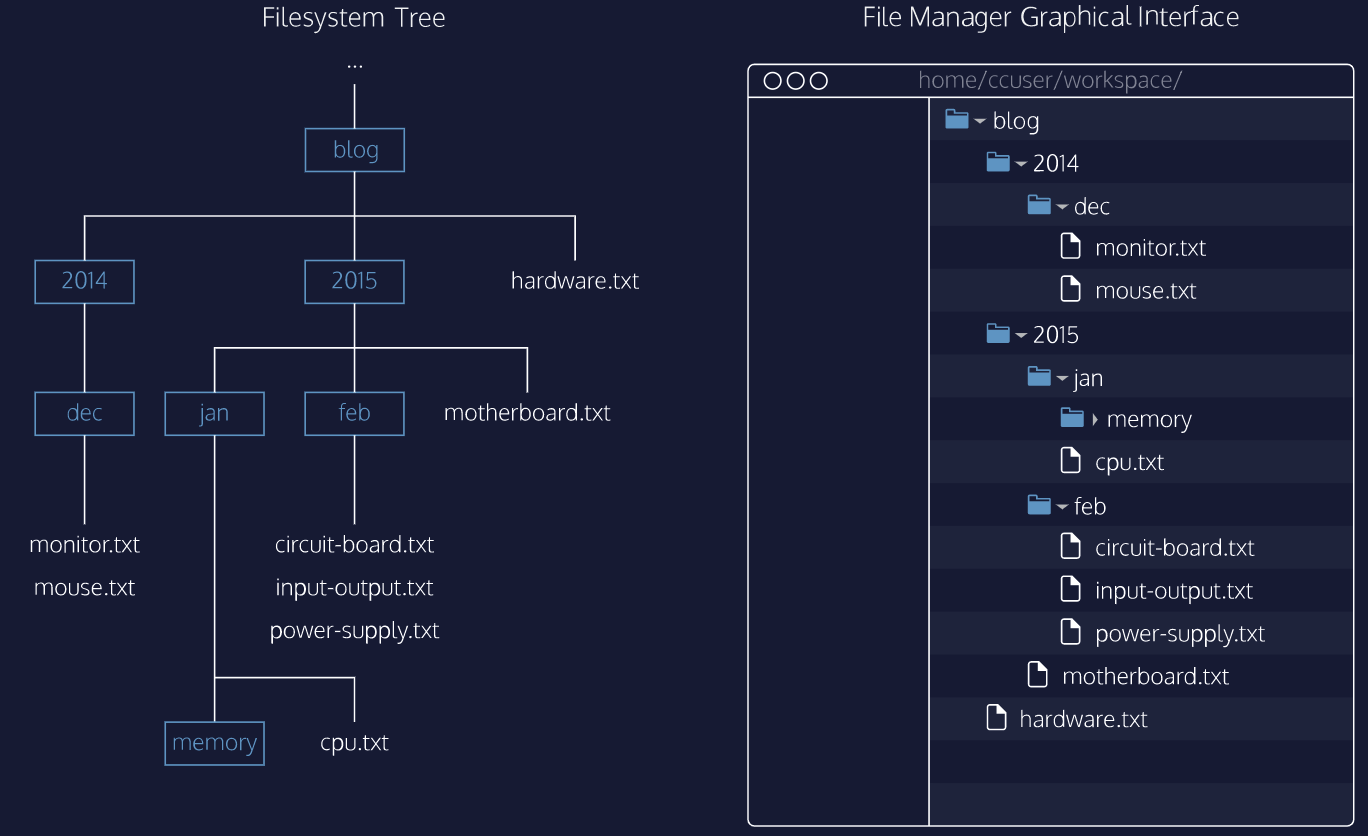
Some things just to know
~ - home dir
. - hidden file
Commands
$ - This is a prompt to enter a command
-- basic --

$ clear
makes it quiet

$ pwd
prints working directory

$ whoami
prints username
-- list --

$ ls
this lists out all child directories and files

NOTE -a -t -l can be used together, in any order like   $ ls -alt

$ ls -a
shows all files even if hidden

$ ls -l
lists all files in long format + permissions

$ ls -t
orders the files in the order they were last modified
Understanding -l
drwxr-xr-x 5 cc eng 4096 Jun 24 16:51 action
^ access rights
^ Num of child dir and files
^ Username of file owner
^ Name of group that owns file
^ size in bytes
^ date last edited
^ file name
drwxr-xr-x
that d at the start specifies that this is a directory if it is a - then you know its a file
-- cd --
changes directory

~/ = home dir

$ cd nameOfChildDir
moves to child directory

$ cd child/grandchild
moves twice

$ cd ..
move up a directory

$ cd ../sibling
moves across

$ cd ../../../
move back 3 times
-- directory manipulation --

$ mkdir nameOfDir
makes directory with name 'nameOfDir'

$ touch name.txt
creates a file