
Networking Overview
A network enables two computers to communicate with each other using various topologies (mesh/tree/star), mediums (Ethernet/fiber/coax/wireless), and protocols (TCP/UDP/IPX). As security professionals, understanding networking is crucial because when the network fails, the error may be silent, causing us to miss something important. 🖥️💻
Setting up a large, flat network is easy, and it can be a reliable network, at least operationally. However, a flat network is like building a house on a land plot and considering it secure because it has a lock 🔒 on the door. By creating many smaller networks and having them communicate, we can add defense layers. Pivoting around a network is not difficult, but doing it quickly and silently is tough and will slow attackers down. Continuing with the house scenario, let's go through these examples:
Example No. 1
Building smaller networks and putting Access Control Lists around them is like putting a fence 🚧 around the property's border that creates specific entry and exit points. Yes, an attacker could jump over the fence, but this looks suspicious and is not common, allowing it to be quickly detected as malicious activity. Why is the printer network talking to the servers over HTTP?
Example No. 2
Taking the time to map out and document each network's purpose is like placing lights 💡 around the property, making sure all activity can be seen. Why is the printer network talking to the internet at all?
Example No. 3
Having bushes around windows 🌳 is a deterrent to people attempting to open the window. Intrusion Detection Systems like Suricata or Snort are a deterrent to running network scans. Why did a port scan originate from the printer network?
These examples may sound silly 😜, and it is common sense to block a printer from doing all of the above. However, if the printer is on a "flat /24 network" and gets a DHCP address, it can be challenging to place these types of restrictions on them.
A Beginner's Guide to Subnetting
A network is a group of computers that can communicate with each other using IP addresses, which are like phone numbers for computers. Most networks use a /24 subnet, which means that the first three sets of numbers in an IP address must be the same for computers to talk to each other. A Penetration Tester is a tool used to test a network's security, but if the tester sets the subnet mask incorrectly, it can cause problems. For example, if the subnet mask is set to /25, it cuts the range of IP addresses in half, which means that a computer can only talk to other computers on "its half" of the IP address range. A Penetration Tester once failed to understand a network and only managed to steal a password from a workstation on the client network without reaching more important targets, like database servers.
A simple example of subnetting would be dividing a network with IP addresses ranging from 192.168.0.1 to 192.168.0.255 into two subnets, each with a maximum of 128 hosts. This can be achieved by using a subnet mask of 255.255.255.128, which allows for two subnets with IP addresses ranging from 192.168.0.0 to 192.168.0.127 and 192.168.0.128 to 192.168.0.255, respectively.
What is a private IP address
A private IP address is an IP address that is not routable on the public Internet. These IP addresses are reserved for use on private networks, such as those in homes, offices, and other organizations. This means that devices on a private network can communicate with each other using these private IP addresses, but they cannot be accessed from the public Internet. RFC 1918 defines three ranges of private IP addresses:
- 10.0.0.0/8
- 172.16.0.0/12
- 192.168.0.0/16
Basic Information
Let us look at the following high-level diagram of how a Work From Home setup may work.
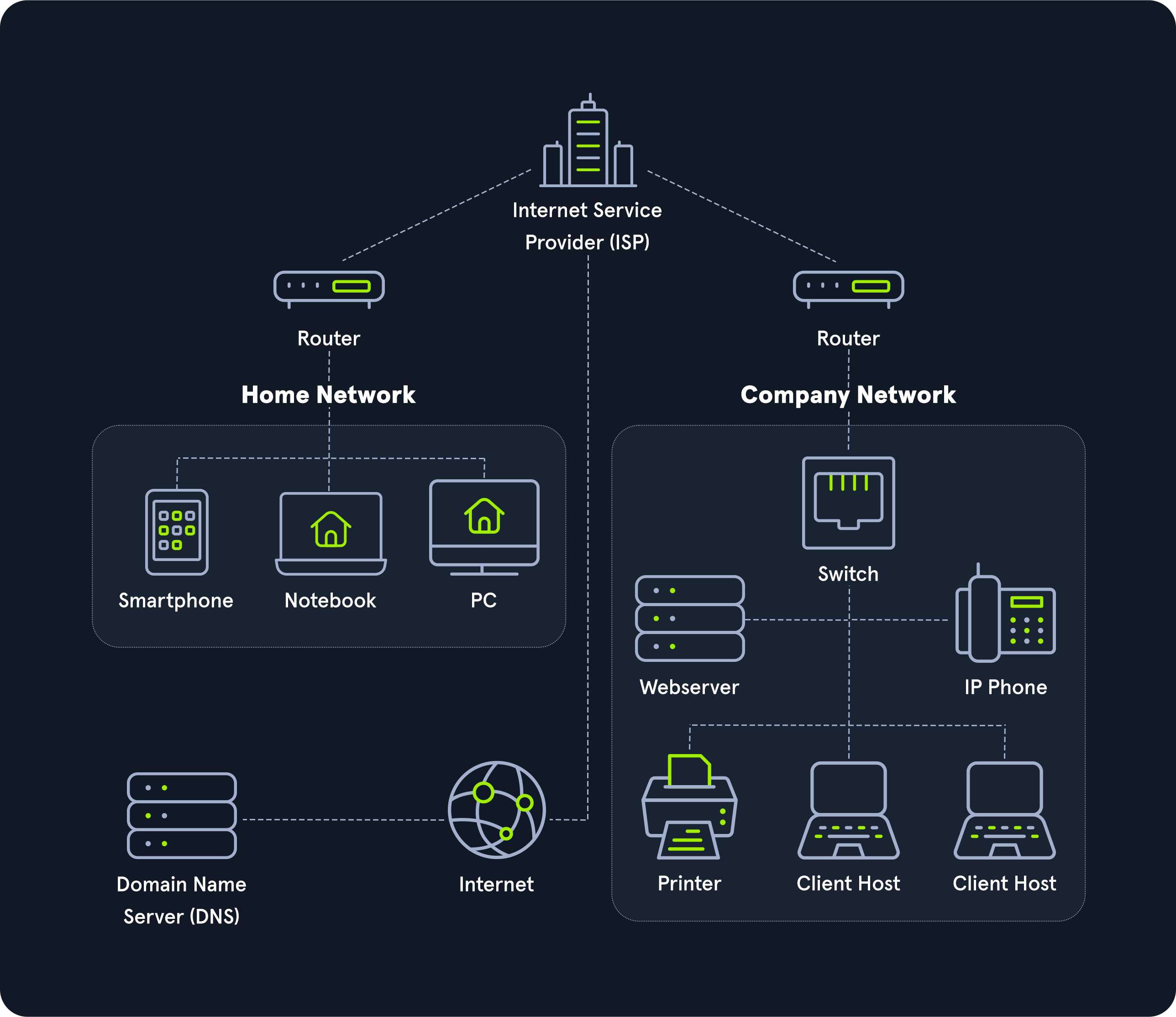
The entire internet is based on many subdivided networks, as shown in the example and marked as "Home Network" and "Company Network." We can imagine networking as the delivery of mail or packages sent by one computer and received by another.
Suppose we want to visit a company's website from our "Home Network." In that case, we exchange data with the company's website located in their "Company Network." Like sending mail or packets, we know the address where the packets should go. The website address or Uniform Resource Locator (URL) which we enter into our browser is also known as a Fully Qualified Domain Name (FQDN).
The difference between URLs and FQDNs is that an FQDN (www.websiteName.eu) only specifies the address of the "building," while a URL (https://www.websiteName.eu/example?floor=2&office=dev&employee=17) also specifies the "floor," "office," "mailbox," and the corresponding "employee" for whom the package is intended. We will discuss the exact representations and definitions more clearly and precisely in other sections.
The fact is that we know the address, but not the exact geographical location of the address. In this situation, the post office can determine the exact location, which then forwards the packets to the desired location. Therefore, our post office forwards our packets to the main post office, representing our Internet Service Provider (ISP).
Our post office is our router, which we utilize to connect to the "Internet" in networking. As soon as we send our packet through our post office (router), the packet is forwarded to the main post office (ISP). This main post office looks in the address register/phonebook (Domain Name Service) where this address is located and returns the corresponding geographical coordinates (IP address). Now that we know the address's exact location, our packet is sent directly there by a direct flight via our main post office.
After the web server has received our packet with the request of what their website looks like, the webserver sends us back the packet with the data for the presentation of the website via the post office (router) of the "Company Network" to the specified return address (our IP address).