
Operating systems
What and why do we need a OS
How was computing done in the 1950s?
- user gives a computer operator a card with the computations on it
- this then would be added to a waiting list FIFO
- computer would then compute
- results would be printed out on paper
What is this called?
Batch processing
When did batch processing become automated?
1960s
What is the OSs relationship with hardware and applications?
It acts as a middle man bridging the two
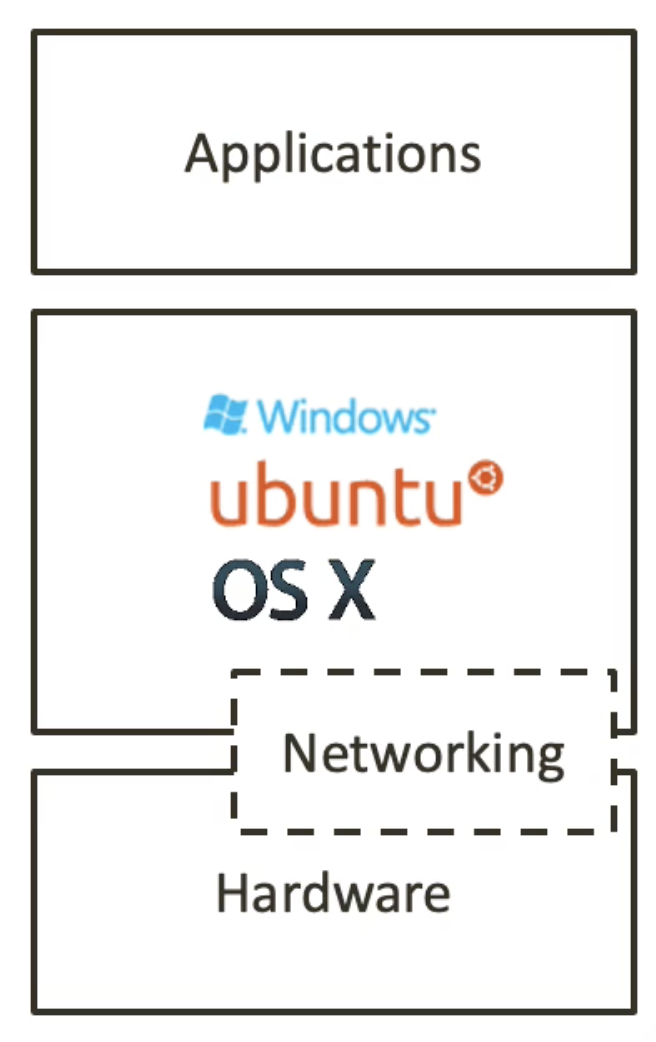
Name the system layer in order from top to bottom
Top
User Mode
- Application layer
- System Programs
Kernel Mode
3. Operating system
4. Hardware
Bottom
Data is exchanged between the layers
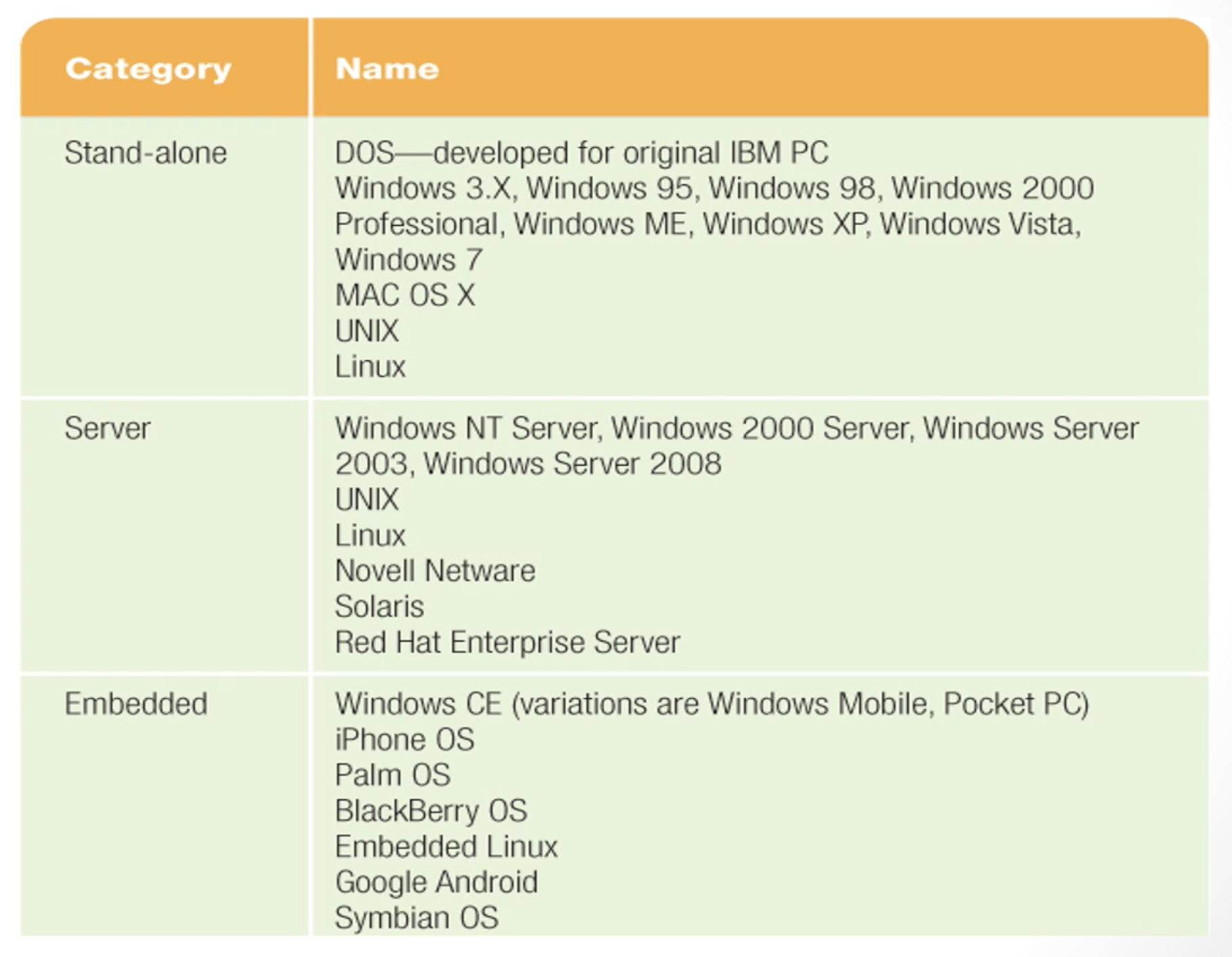
What is a Client OS?
Designed for the Average user
Stand alone - doesn't need to be connected to a network to run
What is a Server OS?
The operating system servers use
Used in client server network enviroments
What is a embedded OS?
Stored in ROM
In dedecated devices
Examples
Do embedded systems need a OS
No - because it is not general purpose
What are the basic functions of a OS
- Starts the computer
- Handles I/O messages
- Manages applications
- Manages memory
- Provides a UI
What does BIOS stand for?
Basic Input Output System
What does POST stand for?
Power-On Self-Test
What are the stages of system start up?
- Located and activate BIOS
- Run POST
- Load OS
- Configure the system
- Load system untilities
- User Authentication
What does the OS do?
Give examples of the following
Manage computer resources
- Controls the CPU
- Provides multitasking
- Handles physical and Virtual memory
- Handles all devices
- File system
- Graphics system
Run programs
- Excel...
- Handling multiple programs
- Handling what the program requires
- Allows for multiple processes
Multi-tasking
What is multi-tasking?
It is the ability for a processor to give the user the illusion that multiple programs are running at the same time.
What is a process
- It is an instantiation of the program
- that has its own segment in memory
- all data is local
- each process has its own identifier
What are the three states of a process
- Running
- Ready
Blocked (cannot run until a event happens) (why would a process be blocked?)
- Waiting for a interrupt
- Waiting to access data, that another process is using
How does a process move between these states?
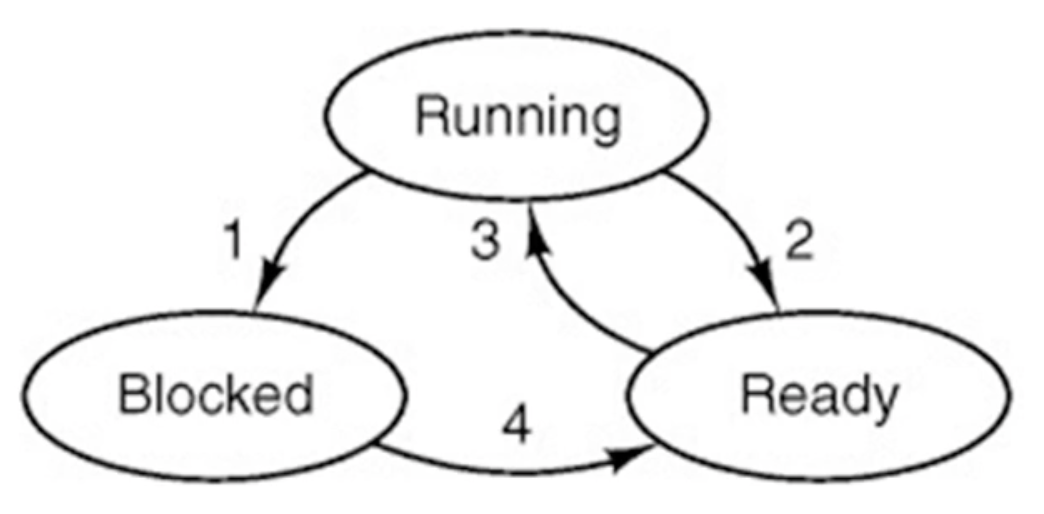
- Blocked waiting for I/O
- Makes way for another process to be run, and goes into a ready state (therefore not being processed by the CPU)
- Process is ready to be run
- I/O has been received now can move to a ready to run state
What is the process manager?
- This is a part of the kernel
- It deals with controlling and scheduling multi-tasking
- Achieves this typically by allocating each process a time slot and then moving onto the the process
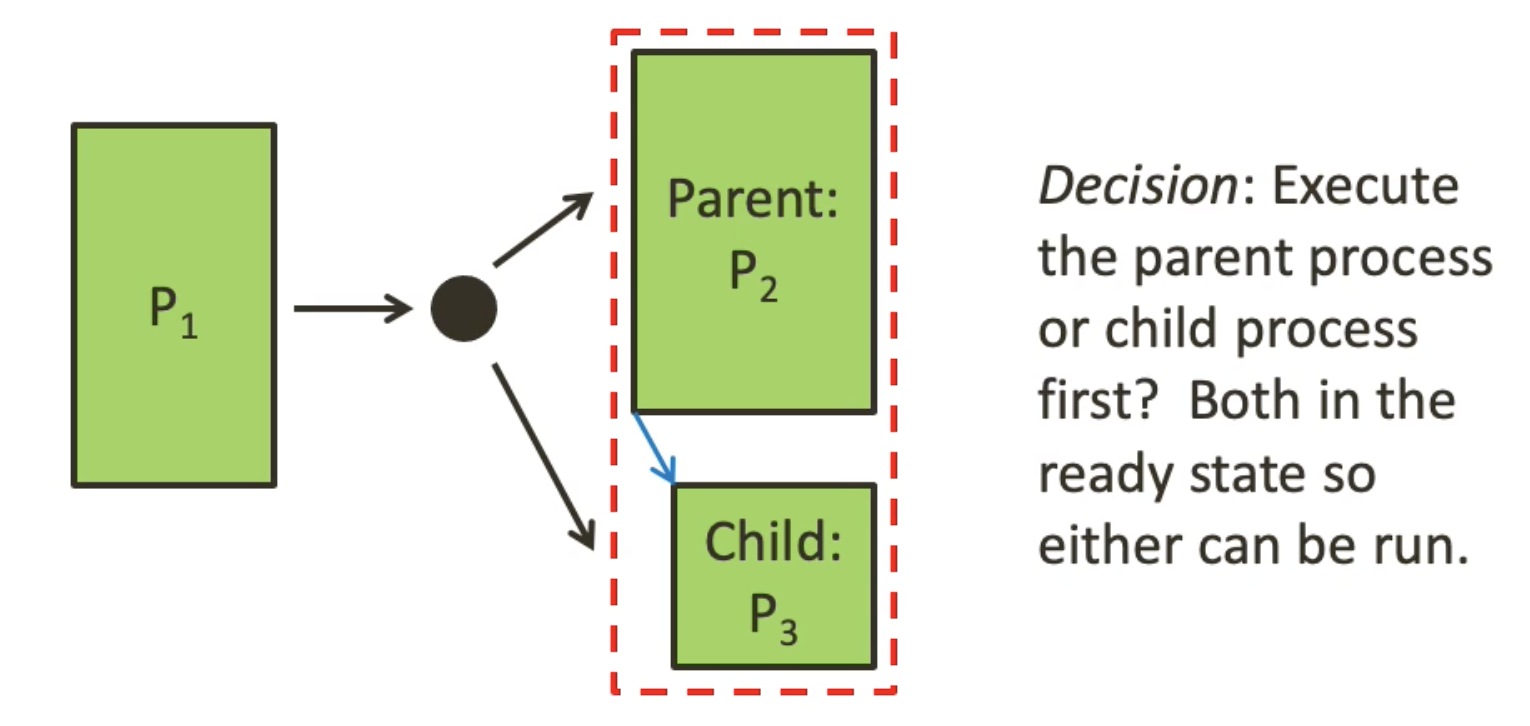
When is a scheduling required?
Note: in cases 1 and 2 the cpu may replace these processes
- When a process exits
- When a process is blocked
- When a new process created by a parent process
4. When a interrupt occurs
What is time quantum?
It is the length of time a process can be run on a CPU for
Name some algorithms
- round robin (gives each process a dedicated time slot)
- shortest job first (completest the shortest job first in order of appearance, so yes the shortest job might be a infante loop)
- priority
- three level scheduling
Give reasons why a process might be created
- System Initialisation
- Running process creates a process
- User request
Give reasons why a process might be terminated
- Normal exit (Voluntary)
- Error exit (Voluntary, process catches the error and then exits)
- Fatal error (Involuntary)
- Killed by another process (Involuntary)
What is a tread?
This is when you divide a process up into processable chunks, they have shared memory, and have their own individual stacks
Memory management
What are overlays?
They are chunks of a program that could be loaded from secondary storage into main memory
Why do we need overlays and what are they used for?
- In the 1950s
- Programs tended to be larger than memory
- Overlays were used to load bite size chunks into main memory from secondary storage
What is the address space?
This is the range of addresses that can be addressed in main memory
This tends to be way larger than, what is actually physically avalable
What are pages
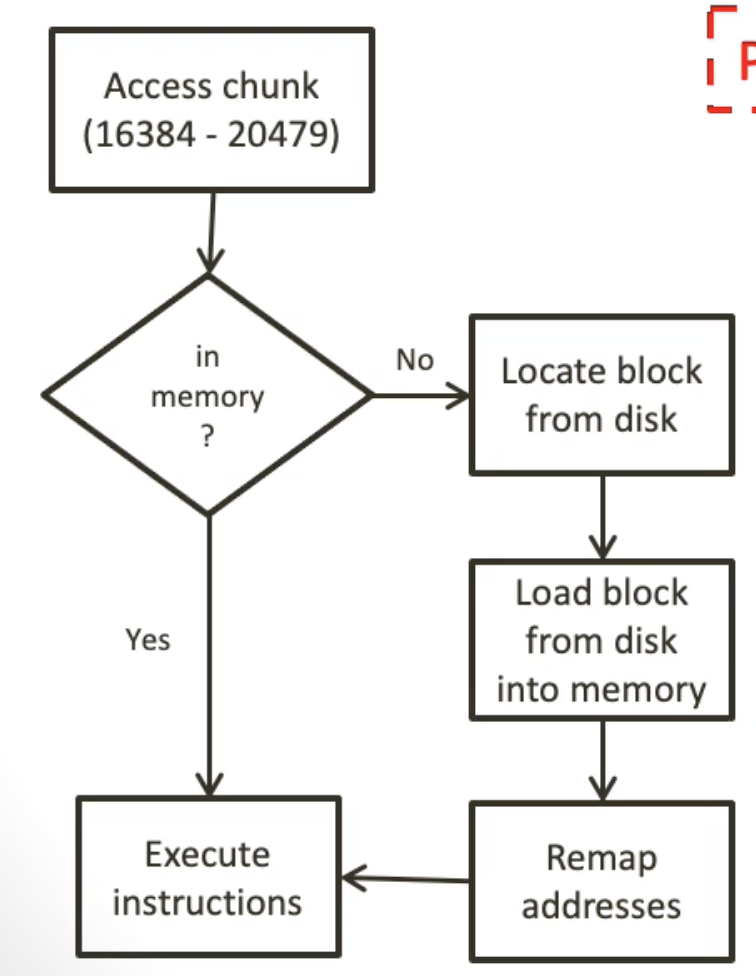
They are chunks of addressable space, that can be loaded into main memory
Draw the process of addressing a chunk
what is this process called?
paging
What is the virtual address space?
It is the address space located in secondary storage
What is the physical address space?
It is the address space located in main memory
What is a virtual page?
A page located in secondary storage
What is a physical page?
A page located in main memory
What is a page table
This is a table linking the virtual pages to the physical pages
Devices & I/O
Describe the two ways of the OS interacting with hardware using device drivers
- The operating system has many device drivers for all different devices even if they do the same job. This is bad because, each time a new device comes out the OS must update.
- There is one standard driver that all manufactures must follow. This means that the OS does not have to update.
Structure of a operating system
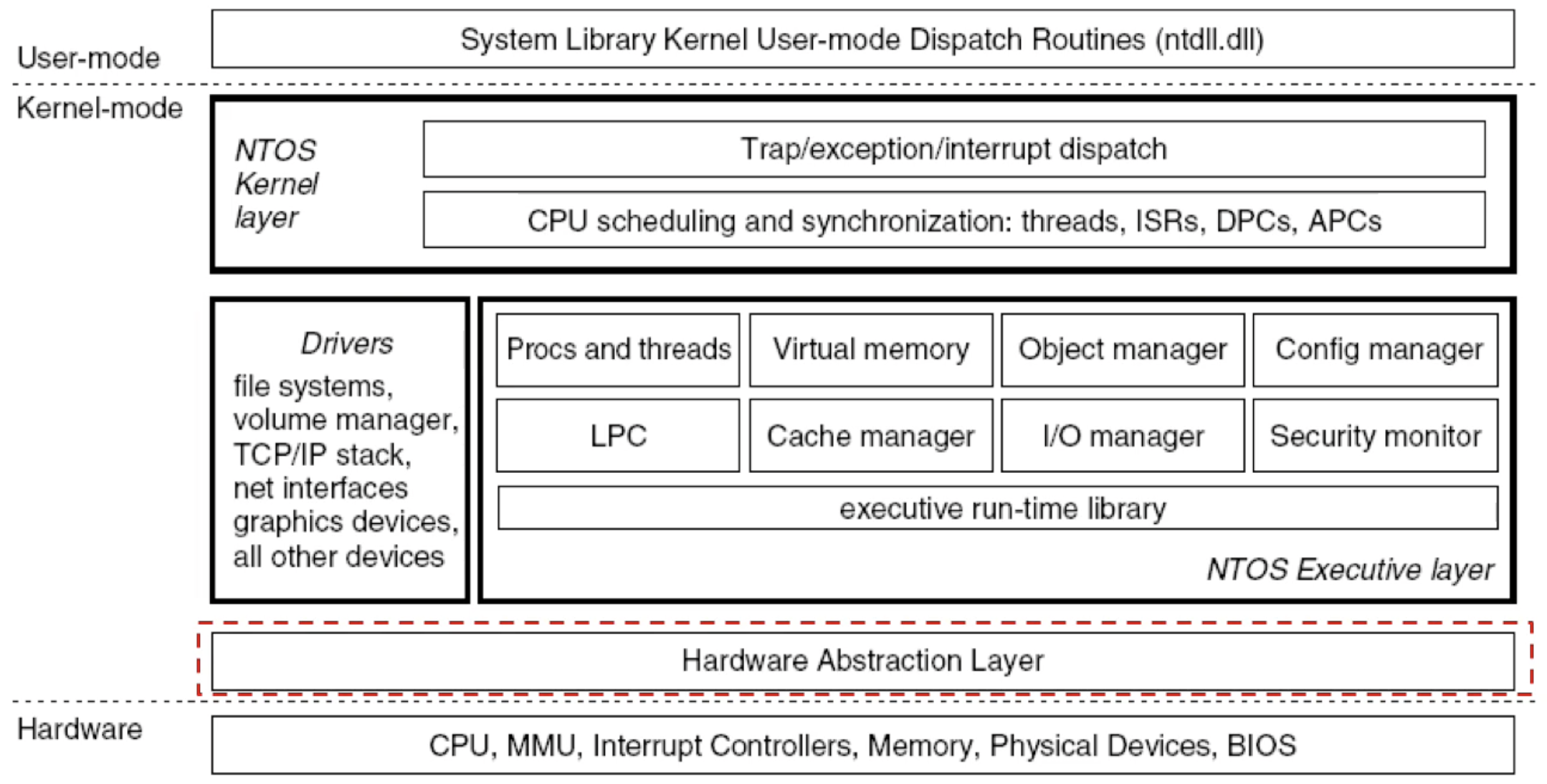
Describe the following
Hardware abstraction layer
- Also known as the HAL
- This is the division between the hardware layer and the kernel
- It contains all the device drivers
- The device drivers map between commands specify to the device and ones that can be interpreted by the rest of the kernel
- This makes the OS platform independent
Kernel-mode
- Has access to hardware and the system resources
- Code is run in a protected memory area
- It controls:
- Scheduling
- thread prioritisation
- memory management
- interaction with hardware
- The Executive layer controls listed elements on the diagram
User-mode
- Comes with a user interface
- Predefined functions that make use of the kernel
- A way to load software and access files